Version history
Clip keeps snapshots of your canvas so a bad hour is never a lost project.
Free on every plan.
What's kept
Up to twenty snapshots per project, taken automatically. Each one is labelled with why it was taken:
- Auto-saved — a routine periodic snapshot.
- Before a big change — the state immediately before something significant happened. In practice this is the one you want, because it's the save from just before things went wrong.
- Before a restore — taken when you restore, so restoring is itself undoable.
You don't manage any of this. It happens.
Looking at an earlier version
Open Version history from the top bar. You get the list, newest first, each entry showing when it was taken and how many objects were on the canvas at the time.
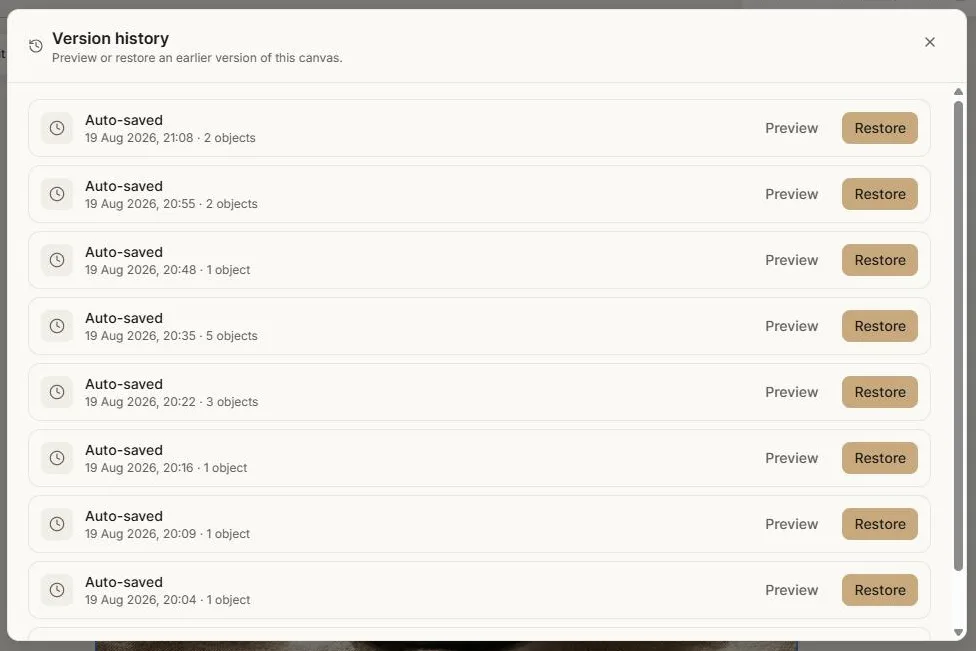
Choose Preview on any entry and Clip loads that version into the editor so you can actually look at it — pan around, zoom in, check whether it's the one you want. A banner makes it obvious you're previewing rather than editing.
While previewing, your current work is held safely aside and autosave is paused, so looking at the past cannot overwrite the present. Exit preview puts everything back exactly as it was.
Restoring
Restore makes that version your canvas again. Clip takes a snapshot of the current state first, so if you restore the wrong one you can go back.
If you have the same project open in another tab, that tab notices the restore and reloads rather than quietly overwriting what you just brought back.
When to use it
- You deleted something an hour ago and now want it.
- An experiment went badly and undo won't reach far enough.
- You want to compare where a piece is now with where it was this morning.
- Something looks wrong and you're not sure what changed.
The safety net underneath
A few things protect your work beyond version history:
- The canvas will not save an empty state over a good one. If loading a project fails, Clip refuses to overwrite what's stored and tells you, rather than silently replacing it with a blank canvas.
- Saving pauses while uploads are still in flight, so a snapshot never captures a half-finished state.
- Load failures are reported rather than swallowed.
One caveat
Previewing an old version while a generation is running swaps the in-progress node out for the duration of the preview. It comes back when you exit. If you can, wait for a generation to finish before browsing history.
Next: Projects & workspaces.