Importing brand guidelines
Most established brands already have a document that says all of this. Upload it and Clip fills the kit in for you.
Starting an import
Open a brand kit and pick Import document at the top of the editor.
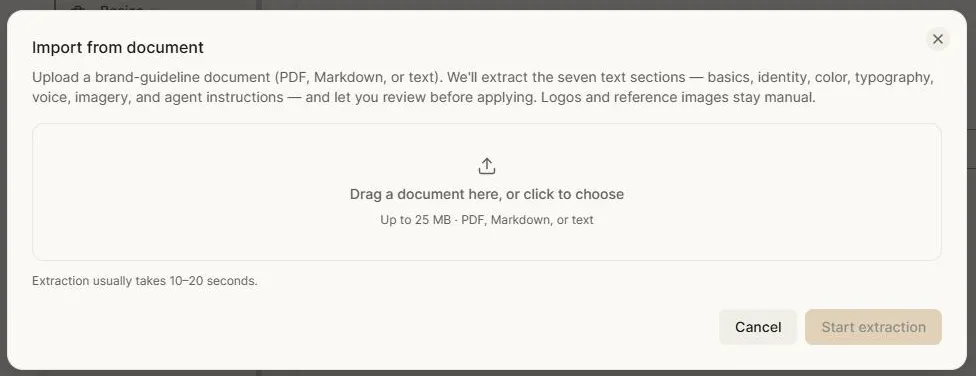
Upload your brand guidelines — a PDF, Markdown or plain text file, up to 25 MB. Usually that's the document a designer or agency produced, however long it is.
Clip reads it and extracts the seven text sections of a kit: basics, identity, colour, typography, voice, imagery, and agent instructions. Extraction normally takes ten to twenty seconds.
Reviewing before anything is applied
This is the important part: nothing is written into your kit until you approve it.
When extraction finishes you get a review screen laid out section by section, showing what Clip found and what it proposes to set.
Where the document and your existing kit disagree, Clip flags it as a conflict and shows both values side by side. You choose which to keep, field by field. A kit you've already invested in doesn't get flattened by an import.
Where a document is ambiguous — two palettes with no indication which is primary, a typeface named but not specified — Clip asks rather than guessing.
Work through the sections, resolve what's flagged, and apply. Anything you skip is simply left as it was.
What imports well
Colours. Hex values in a guidelines document are unambiguous and come across cleanly.
Typography. Named typefaces and their roles.
Positioning, mission and voice. These are usually written as prose in the document, which is exactly the form the kit wants.
What needs your hand afterwards
Logos and reference images. These stay manual by design — the importer reads text, and a logo embedded in a PDF is at document resolution rather than the real asset. Upload the actual files.
Fonts. A document names the typeface; it doesn't contain the licensed font file. Upload that separately if you want it in the kit.
Agent instructions. Standing rules for the AI usually aren't in a human-facing brand book, because they're a new idea. Write those yourself, or ask the copilot.
Import, then refine
The natural sequence is import first, copilot second: get the factual material out of the document in one pass, then use the copilot to fill the gaps and sharpen what's thin.
Next: Stock photos & uploads.