Creating audio
Voiceover, narration, dialogue and music — generated on the canvas, ready to drop into a video.
Audio generation is on the paid plans.
The generator
Pick Audio Generator from the tool rail.
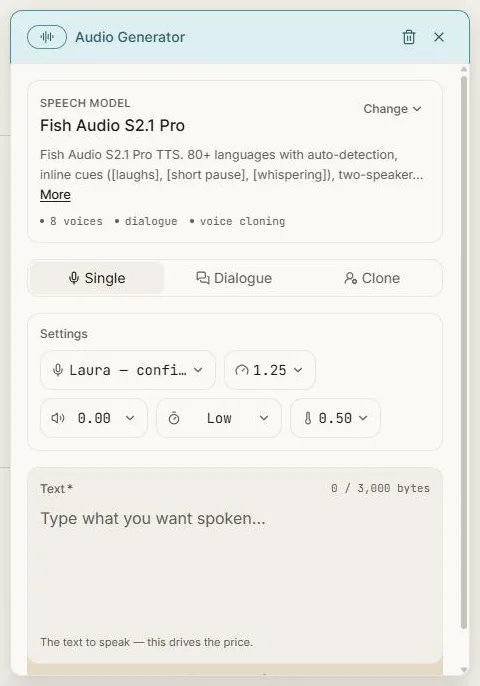
Three modes
Single — one voice reading your text. The everyday case: a voiceover, a narration bed, a line for an ad.
Dialogue — two speakers in conversation, each with their own voice.
Clone — generate speech in a specific voice you provide. Available on higher plans.
Writing for speech
The Text field is what gets spoken, and it's what drives the price — you're charged by how much audio you're asking for, and the character count sits above the box.
Write it as it should sound. Punctuation does real work: commas and full stops become pauses. You can also place inline cues in square brackets to direct the performance:
Morning. [short pause] This is Ember — small-batch coffee, roasted this week. [laughs] Yes, really this week.
Cues like [laughs], [short pause] and [whispering] are interpreted rather than read aloud.
Over eighty languages are supported with automatic detection, so you can simply write in the language you want.
Voice and delivery
Voice — pick from the built-in cast. Each is described by character rather than by a model name, so "confident female narrator" tells you what you're getting.
Speed — faster or slower than natural pace.
Volume, stability and similarity — fine control over how consistent and how expressive the read is. The defaults are sensible; leave them alone unless something specific is wrong.
The result
Audio lands on the canvas as a card you can play in place. From there you can download the file, or take it into the video editor, where it becomes an audio track you can trim, fade and lay under your footage.
Generated video already comes with synchronised sound of its own — the audio generator is for the times you need a specific script, voice or piece of music rather than whatever the video model produced.
Next: The content writer.