Editing images
A generated image isn't finished, it's a starting point. Select any image on the canvas — generated, uploaded, or from stock — and a toolbar of AI actions appears above it.

Reading the toolbar
Every AI action shows its price on the button. Tools with no price are free.
| Tool | Cost | What it does |
|---|---|---|
| Edit Now | ⚡14+ | Describe a change in plain words |
| Upscale | ⚡4 | More resolution, for print or big screens |
| Remove BG | ⚡4 | Clean cut-out, one click |
| Eraser | ⚡8 | Brush something out; the gap fills in |
| Create Layers | ⚡10 | Split the picture into separate pieces |
| Edit text | ⚡1 | Rewrite words inside the picture |
| Adjust | free | Brightness, contrast, colour |
| Expand | ⚡8 | Extend the picture beyond its edges |
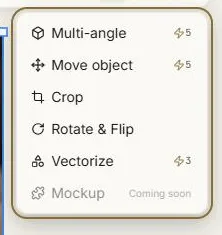
The ⋯ button holds the rest:
| Tool | Cost | What it does |
|---|---|---|
| Multi-angle | ⚡7 | The same subject from other camera angles |
| Move object | ⚡14+ | Drag something to a different place in the picture |
| Crop | free | Reframe without squashing |
| Rotate & Flip | free | Turn and mirror |
| Vectorize | ⚡3 | Convert to crisp, scalable line art |
| Mockup | — | Coming soon |
⚡14+ means the price follows the size of the picture you're editing: ⚡14 below 2K, ⚡20 from 2K, ⚡30 at 4K. Every other price is flat.
Two rules worth knowing
Your original is never destroyed. AI edits produce new work alongside the source. If an edit isn't right, you still have what you started with.
The price is on the button before you press it. No action spends credits without showing you the figure first.
Make the toolbar yours
You can pin your favourite tools to the main bar and let the rest live under ⋯. Use the customise control at the end of the toolbar. Eight tools fit on the bar; the order is fixed so things stay where your hand expects them.
What happens while an edit runs
Edits behave like any other generation: a progress indicator, a timer, and results that survive a page reload. Several can run at once, up to your plan's limit.
Tools that don't appear
The toolbar adapts to what it's looking at.
- Vector images get a short toolbar — rotate, flip and download. The raster tools don't apply to line art, and re-vectorising something that's already vector would just cost credits for nothing.
- 3D models get View in 3D and Download.
- Video gets playback controls.
Where to go next
- Retouching & cutouts — Edit Now, Eraser, Remove BG, Upscale
- Reshaping images — Expand, Multi-angle, Move object, Edit text, Create Layers, Vectorize
- Free editing tools — Crop, Rotate & Flip, Adjust
Next: Retouching & cutouts.