Choosing a model
Every generator runs on a model, and Clip lets you choose which one. More than 100 are available across images, video, 3D and audio.
The model picker is on the paid plans. On the free plan, image generation runs on Clip's fast default model.
When to bother
Mostly, don't. Each generator opens on a strong default that suits the majority of work, and the difference between models matters far less than the difference between a vague prompt and a specific one.
Change the model when you have a concrete reason:
- Text inside the image needs to be correct. Some models are markedly better at rendering words.
- You need a specific length, resolution or aspect ratio the current model doesn't offer.
- You're working from many reference images and need one that accepts them.
- You want it cheaper, and a draft-quality result is fine.
- You want it better, and the price is worth it.
Reading the picker
Open Change at the top of any generator form.
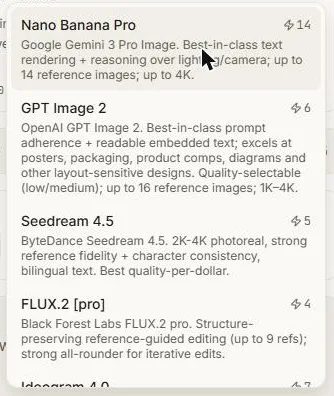
Each model is described in plain language, with the things that actually decide the choice:
- What it's good at, in a sentence.
- Its capability chips — size range, how many aspect ratios, how many reference images, whether it does audio, whether it needs a start frame.
- Its price.
The form rebuilds itself around whichever model you pick. Controls a model doesn't support simply aren't shown, so you can't set something that will be ignored. Values carry across where they still make sense and are adjusted where they don't — pick a model with a shorter maximum duration and your setting moves into range rather than failing.
The price is the price
The figure on the Generate button is the exact number of credits you will be charged, for the exact combination of options you've set. It is not an estimate, and it updates as you change things.
Options that move the price say so. Duration and resolution move video prices most; size moves image prices; extras like PBR materials move 3D prices.
Per-node memory
The model you choose is remembered by that node. Set one up the way you like it and every generation from it stays consistent — and a second node can be set up differently for comparison.
Where the model name shows
Deliberately, the model picker is the only place you choose a model, and the Details panel on a finished result is the only place Clip names the model that made it. Everywhere else the product talks about what you're making, not what's making it.
Next: Style presets.