Creating 3D models
Clip turns a description or a photograph into a real, textured 3D model you can spin, inspect and download.
3D generation is on the paid plans.
The generator
Pick 3D Generator from the tool rail.
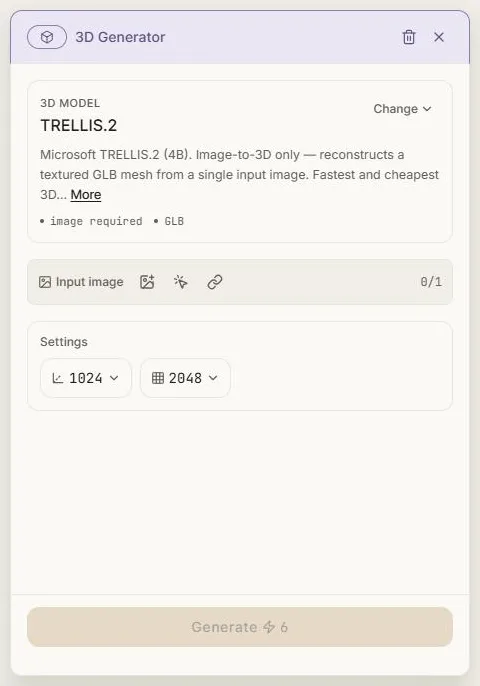
Text or image
A 3D request takes one or the other, not both:
- Text — describe the object. Good for props and concepts that don't exist yet.
- Image — turn a picture into a 3D model. Reliable, because the AI can see the thing. Some models take several photographs of the same object from different angles for a better result.
Models that only work from a picture say image required and lock the toggle to Image.
Settings
What's on offer depends on the model, and only the controls it supports are shown:
- Texture quality and texture size — how detailed the surface is.
- Geometry detail, topology, face limit or polygon count — how dense the mesh is. Lower is lighter for games and the web; higher holds up under close inspection.
- PBR — physically based materials that respond properly to light in a 3D scene.
Some combinations are mutually exclusive and Clip won't let you set both.
Cost
3D is cheaper than you'd expect — a straightforward image-to-3D pass runs around ⚡11 on the fastest model. Options like PBR materials and multiple input photographs add to it, and the button always shows the current total.
Generation takes minutes, and the highest-quality models can take fifteen or more. The node shows progress and an elapsed timer, and you can leave and come back.
The result
The 3D model lands on the canvas as a card with a 3D badge. Clip renders a thumbnail of the actual mesh so you can see what you got at a glance.
Select it and you get two actions:
- View in 3D — opens an interactive viewer. Drag to orbit, scroll to zoom, and inspect the model from any angle with proper lighting.
- Download — saves a
.glbfile, the standard format for games, product visualisation and 3D renders.
The ordinary image tools don't appear on a 3D model, because they operate on pixels and a mesh isn't pixels.
Next: Creating audio.