Free editing tools
Three tools on the image toolbar cost nothing, on every plan including the free one.
Crop
Reframes a picture without squashing it.
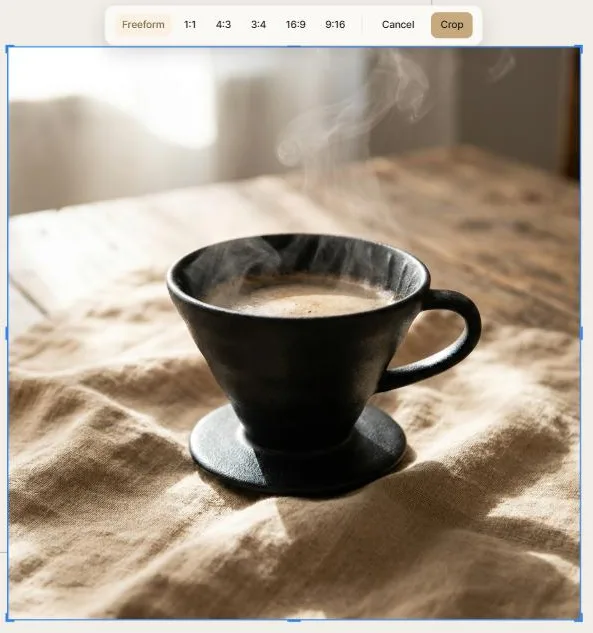
Crop is a mode: enter it, adjust, then confirm or cancel. That's deliberate — cropping is destructive enough that it shouldn't happen from a stray double-click.
- Drag the handles to set the region freehand.
- Pick a ratio — the presets snap the crop to a standard shape.
- Drag the picture inside the window to choose which part shows.
Dragging a handle by hand switches the pill back to Freeform, because once you've adjusted the rectangle yourself a lit ratio would be a lie. Moving the picture within a fixed window keeps the ratio, because the shape hasn't changed.
Confirming produces a new image beside the original at full resolution. That matters: every AI tool works from the actual picture, so a crop that only hid the edges would quietly send the uncropped original to the model. Clip crops for real.
Cancelling restores exactly what you started with.
Rotate & Flip
Turn a picture in 90° steps, or mirror it horizontally or vertically. Instant, free, and undoable.
Adjust
A proper set of image corrections, with a live preview on the canvas as you drag.
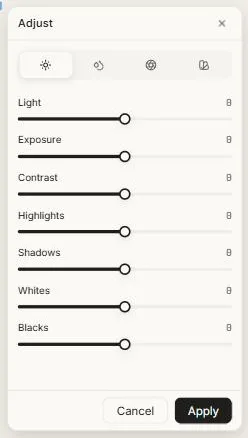
The Light tab carries exposure, contrast, highlights, shadows, whites and blacks — the same controls a photo editor gives you, so you can lift shadows without blowing out the highlights rather than just pushing brightness. Further tabs handle colour and effects.
This is ordinary image correction, not AI — no credits, no waiting. Use it to warm a picture up, rescue a flat one, or match two images that were generated separately and don't quite sit together.
Adjust is a mode: Apply commits, Cancel leaves the original untouched.
Rename
Not on the toolbar, but worth knowing here: everything on the canvas can be renamed, and your name is what appears in the layers panel and in search. Generated work is named automatically from your prompt, so this is mostly for tidying up.
Details
Right-click any AI-generated object and choose Details to see the prompt, model and settings that produced it. Free, and the fastest route to recreating something you liked.
What else is free
Worth restating, because it's unusual: the entire editor costs nothing. Moving, resizing, aligning, distributing, frames, auto layout, grouping, locking, layers, the minimap, search, undo, version history and exporting are all free on every plan.
Credits buy AI work — generating, AI edits, and replies from the chat agent. Nothing else.
Next: Design chat.