Account & settings
Open Settings from your account menu, top right.

Five tabs: Profile, Preferences, Workspaces, Organizations and Billing. Billing is admin-only on team plans.
Profile
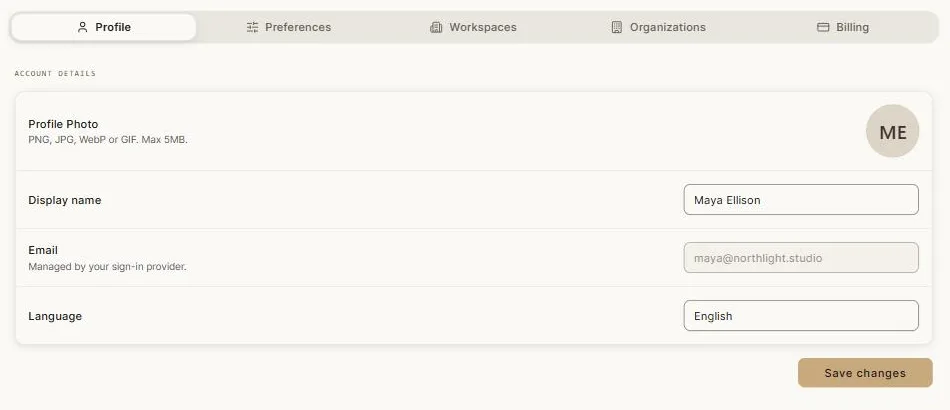
Profile photo — PNG, JPG, WebP or GIF, up to 5 MB.
Display name — what teammates see.
Email — managed by your sign-in provider, so it's shown here but changed there.
Language — the interface language. Clip ships in English, Arabic, Spanish, French and Chinese. Changing it translates the interface only; your own work is never touched.
Devices

Accounts are for one person. You can be signed in on up to two desktop sessions and one mobile session at a time.
The device list shows everywhere you're currently signed in, with the platform, browser and location, and marks your current device. You can sign out any of them remotely — useful if you've left yourself logged in on a machine you no longer have.
If you hit the limit, sign out a device you're not using.
Preferences
Interface preferences, including the theme. Clip has a full light and dark theme covering everything, the canvas included.
Notifications are here too: eight individual switches, so you can keep the ones that matter — a generation finishing, an invitation, a billing event — and silence the rest.
Workspaces
Create, rename, describe and remove workspaces; manage who belongs to each and what they can do; set per-workspace credit allowances on team plans; and see a weekly usage chart per workspace.
Organizations
Invite people, set and change roles, track pending invitations, and see your seat usage.
Billing
Your plan, your credit history filtered by week or month, credit-pack purchases, promo-code redemption, payment details and invoices.
See Credits & billing.
Notifications and announcements
The bell in the top bar is one inbox for everything: finished generations, invitations, billing events. Each notification takes you straight to whatever it's about. Mark them read one at a time or all at once.
Separately, product news appears in place — on the home page, on the canvas, or above the chat — and can be dismissed once you've read it.
Signing out
From the account menu. If your account is ever suspended, Clip tells you plainly rather than failing strangely.
Next: Keyboard shortcuts.